


Why Is My LiFePO4 Battery Not Charging
Why Is My LiFePO4 Battery Not Charging? Causes & Fixes
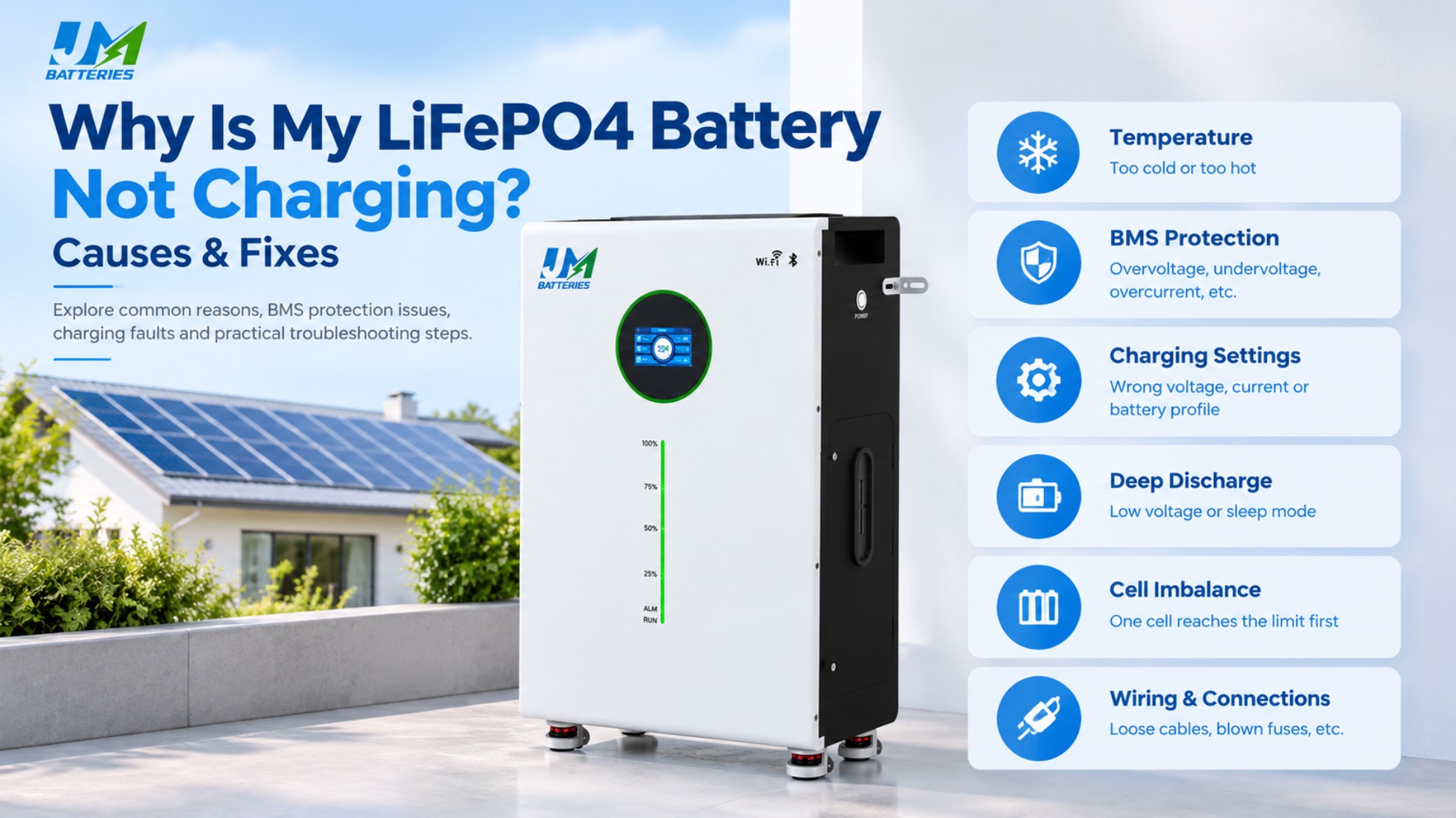
You check your solar system in the morning, but the battery has barely gained any charge. The inverter is running, the solar panels are producing power, and yet the battery is not accepting energy. Sometimes charging never starts. In other cases, it begins normally and stops unexpectedly.
A LiFePO4 battery that is not charging may be responding to a protection condition, receiving incorrect charging parameters, experiencing a connection problem, or operating outside its permitted temperature range. The battery itself is not necessarily defective.
The most effective approach is to identify where the charging process stops instead of immediately replacing the battery or changing multiple settings. This guide explains the common causes, practical diagnostic steps, and safety considerations for residential lithium iron phosphate battery systems.
Table of Contents
1. Quick Checks: Start Here
Before opening equipment or changing electrical settings, review the basic conditions that determine whether a battery can charge.
- Check the charging source: Confirm that the solar charge controller, inverter-charger, or other approved charging device is receiving power and operating normally.
- Check the battery temperature: Determine whether the battery is too cold or too hot to accept charge according to its manufacturer's specifications.
- Check the BMS status: Look for protection alarms, warning indicators, or fault codes in the battery monitoring interface.
- Check the charging settings: Verify that the configured voltage, current, and battery profile match the battery documentation.
- Check the connections: Look for visible cable damage, loose external connections, or blown fuses. Isolate the equipment before inspecting electrical connections.
If the charging source is working but the battery current remains at zero, the next step is to determine whether the battery management system has restricted charging or whether the charging equipment cannot communicate with the battery correctly.
2. Why Is My LiFePO4 Battery Not Charging?
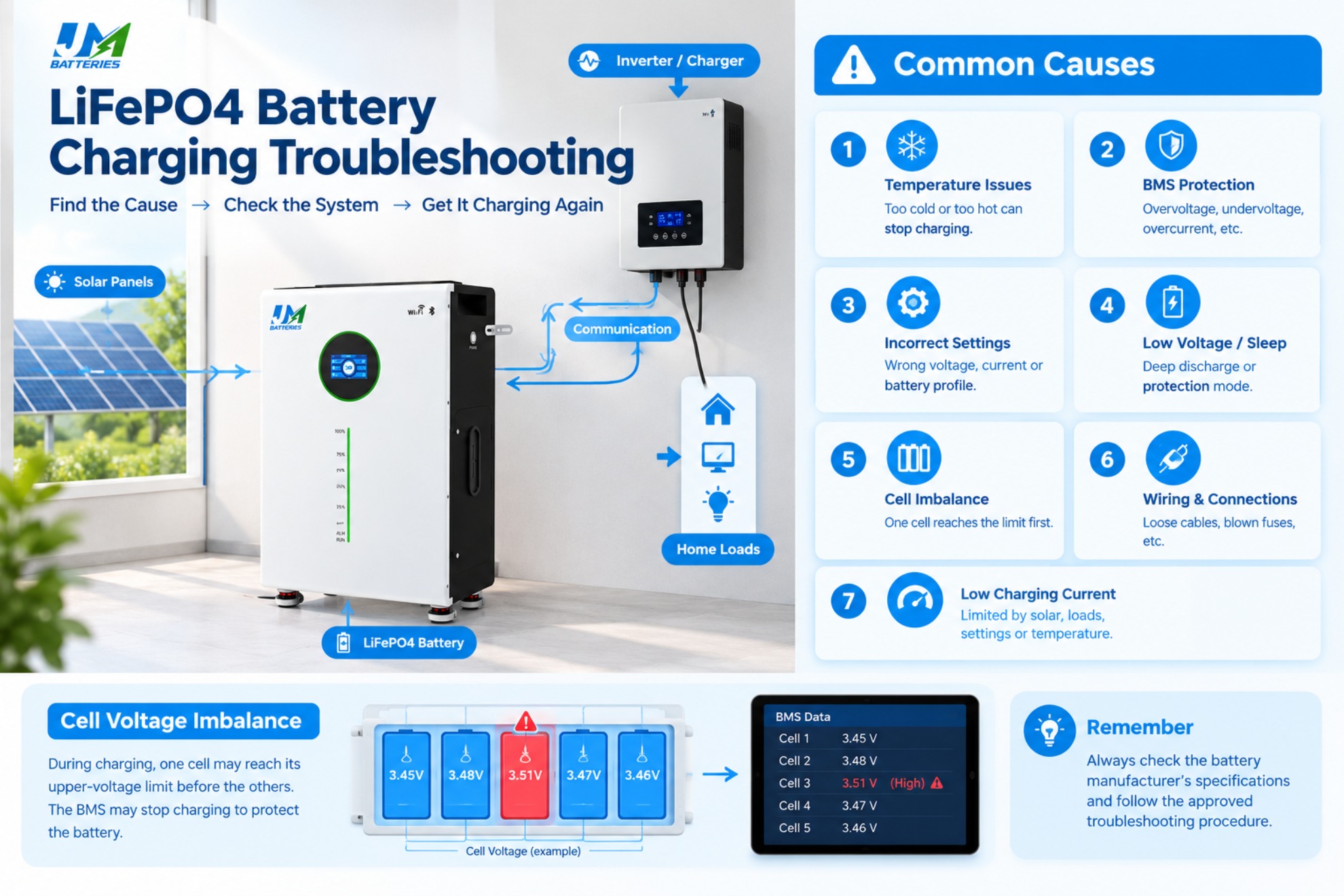
2.1. The Battery Is Too Cold or Too Hot
Temperature is one of the first things to investigate when a lithium iron phosphate battery stops charging.
LiFePO4 cells have a permitted charging temperature range specified by their manufacturer. When the cell temperature falls below the allowed limit, the battery's management system may prevent charging. High temperatures can also trigger charging restrictions or other protective responses.
Cold-weather charging deserves particular attention. Charging lithium-ion cells below their permitted temperature range can cause lithium plating, which may damage the cells and compromise long-term performance. A battery that is cold to the touch is not necessarily at the same temperature as its internal cells, so use available battery temperature readings when possible.
What to check:
- Review the battery's specified charging temperature range.
- Check the temperature reported by the battery management system, if available.
- Confirm whether a low-temperature or high-temperature protection alarm is active.
- Allow the battery to return to an approved operating temperature before charging, following the manufacturer's instructions.
Do not assume that every LiFePO4 battery supports low-temperature charging. Some models include heating systems, but their operation and charging conditions vary by design.
2.2. The Battery Management System Has Restricted Charging
The battery management system (BMS) monitors operating conditions and helps protect the cells from unsafe voltage, current, and temperature conditions. Depending on the battery design, it may also monitor cell balance, communication status, and other fault conditions.
If the BMS detects a condition outside its permitted limits, it may stop or restrict charging. The external symptom can be confusing: the inverter appears to be working, but the battery receives little or no charging current.
Possible triggers include:
- A cell reaching its upper-voltage limit.
- Battery temperature falling outside the permitted range.
- A charging current or voltage condition exceeding configured limits.
- A persistent BMS fault or internal protection event.
- A communication or configuration issue, depending on the system design.
What to check: Read the available BMS alarms and event history before resetting the system. If a protection event is recorded, identify the underlying cause rather than repeatedly restarting the battery.
Never bypass the BMS or attempt to force the battery to accept charge. Recovery procedures vary by battery model, and an incorrect procedure can create a safety risk or cause permanent damage.
2.3. The Charger or Inverter Settings Are Incorrect
A charging device may supply the wrong voltage or use an unsuitable charging profile for the connected battery. This can happen after an inverter replacement, a settings reset, a battery upgrade, or an installation in which the battery profile was never configured correctly.
Important parameters include:
- Charging voltage: The configured charging limits must match the battery manufacturer's requirements.
- Charging current: The permitted current depends on the battery specification and the system configuration.
- Battery profile: The charger must use an appropriate lithium battery setting rather than an incompatible charging profile.
- Protection settings: Configured voltage and current limits must not conflict with the battery's operating requirements.
Do not copy settings from another battery simply because both batteries are labeled LiFePO4. Different models can have different voltage limits, current ratings, and communication requirements.
For a broader explanation of system-level issues, see why battery and inverter compatibility matters.
2.4. The Battery Has Entered a Low-Voltage or Sleep State
A deeply discharged battery may activate low-voltage protection or enter a sleep state, depending on its design. In this condition, the battery may not respond to a normal charging command in the way the user expects.
However, a low voltage reading does not automatically mean the battery can be safely recovered. The reading may reflect the battery's protection state, the measurement method, or an underlying fault. A severely discharged battery may require assessment before charging resumes.
What to check:
- Compare the measured voltage with the manufacturer's minimum operating and recovery limits.
- Check whether the BMS reports low-voltage protection or a sleep state.
- Consult the approved recovery procedure for the exact model.
- Stop if the battery shows physical damage, unusual heating, swelling, or other abnormal signs.
Do not use an arbitrary charger or a force-charging technique to revive a deeply discharged battery. If the manufacturer's recovery instructions are unclear, contact the supplier or a qualified technician.
2.5. Cell Voltage Imbalance Is Interrupting Charging
A battery pack contains multiple cells connected in a defined configuration. Although the pack has an overall voltage, the voltage of each cell can differ slightly during operation.
During charging, one cell may reach its upper-voltage limit before the other cells are fully charged. If the BMS responds by stopping or restricting charging, the battery may appear to stop charging before reaching its expected state of charge.
Possible contributing factors include differences in cell characteristics, operating history, temperature, or the amount of time the pack spends near the top of charge. The specific cause cannot be established from pack voltage alone.
What to check:
- Review individual cell-voltage readings if the BMS provides them.
- Check whether charging stops when one cell approaches its permitted upper limit.
- Review relevant BMS warnings and event records.
- Follow the manufacturer's balancing and diagnostic procedure.
A cell-voltage difference does not automatically prove that a cell has failed. Interpret the readings according to the battery's design and the conditions under which the measurements were taken.
2.6. Wiring, Fuses, or Connections Are Preventing Charging
Charging problems are not always caused by the battery or its software. An interrupted electrical path can prevent charging current from reaching the battery.
Potential causes include a blown fuse, a disconnected cable, a loose terminal, a damaged connector, corrosion, or a wiring error. Depending on the installation, a problem in the charging circuit can also cause intermittent operation or an unexpected voltage drop.
What to check:
- Inspect accessible cables and connectors for visible damage.
- Check whether the relevant fuse or circuit protection device has operated.
- Review the installation diagram and confirm that the charging path is correctly configured.
- Have a qualified person verify voltage and continuity where required.
Do not disconnect live battery cables or probe exposed high-current terminals unless you are qualified and equipped to do so. Isolate the system according to the manufacturer's procedure before inspecting connections.
2.7. Charging Current Is Too Low or Charging Is Intermittent
Sometimes a battery is charging, but the process is slower than expected. This is different from a battery that accepts no charging current at all.
Charging current can be affected by solar production, household loads, charger capacity, configured current limits, battery temperature, and the battery's current state of charge. Some systems also reduce charging current as the battery approaches the upper end of its charging range.
For example, if solar panels are producing only a small amount of power while household loads are operating, little energy may remain available to charge the battery. The battery may therefore gain charge very slowly without having a fault.
Compare the actual charging current with the expected current under the same operating conditions. Check the available power, active loads, charger limits, and battery status before concluding that the battery is defective.
3. Step-by-Step Troubleshooting
A consistent diagnostic sequence helps narrow down the problem without making unnecessary changes to the system.
Step 1: Confirm That the Charging Source Is Working
Determine whether the charging source is actually producing power. For a solar system, check the charge controller or inverter display for solar input, charging status, and any reported faults. If the system uses an AC charger, confirm that it has input power and is operating normally.
Do not rely on the fact that the inverter is switched on. An operating inverter does not necessarily mean that the battery is receiving charging power.
Step 2: Check Battery Voltage and Charging Current
Review the battery voltage and charging current displayed by the monitoring system, where available. Compare the readings with the battery's documented operating range and the charging device's status.
A zero-current reading can indicate that charging is disabled, that the charging source is unavailable, or that the system is not measuring or reporting current as expected. It is a diagnostic clue, not a complete diagnosis.
Step 3: Review BMS Alarms and Temperature
Look for temperature alarms, cell-voltage warnings, low-voltage protection, or other BMS fault codes. Record the alarm before clearing it, if the system allows this safely.
Use the manufacturer's documentation to interpret the code. The same symptom can have different causes across battery models.
Step 4: Verify Charger and Inverter Parameters
Compare the charging voltage, current limits, and battery profile against the battery documentation. If communication is required, confirm that the devices support the relevant protocol and that the wiring and configuration follow the manufacturers' instructions.
For more detailed guidance, read how to match a battery and inverter.
Step 5: Inspect the External Electrical Connections
Look for visible damage, disconnected cables, or signs of overheating. Check protective devices only after following the required isolation procedure. If the fault requires electrical testing, have a qualified technician perform it.
Step 6: Follow the Model-Specific Recovery Procedure
If the battery is in a protection or sleep state, use only the recovery method approved for that model. If the battery remains unresponsive, or if the cause is unclear, stop troubleshooting and contact the manufacturer.
Important: Do not bypass battery protection, repeatedly reset unexplained faults, or force-charge a battery that may be damaged. When readings or alarms indicate an unsafe condition, stop and seek qualified support.
4. Practical Troubleshooting Examples
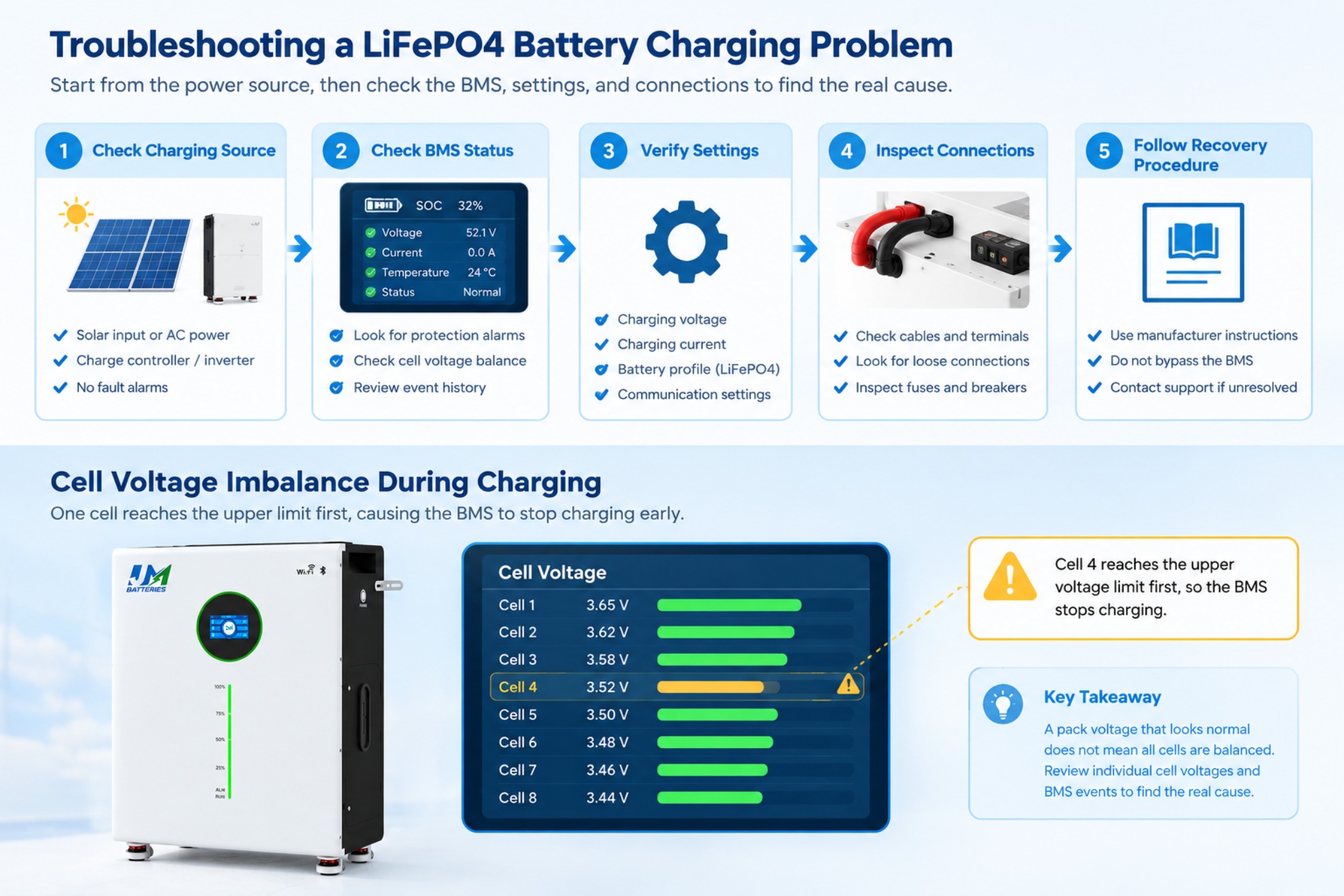
The following examples are hypothetical scenarios illustrating how the diagnostic process can be applied. They are not presented as documented customer cases.
Example 1: Charging Stops on a Cold Morning
A homeowner notices that the solar system is producing power, but the battery is not charging early in the morning. The inverter shows no obvious fault, and the battery state of charge remains unchanged.
The first step is to check the battery temperature and BMS status. If the battery reports a low-temperature charging restriction, the charging interruption may be a protective response rather than a hardware failure.
The appropriate response is to follow the manufacturer's temperature and recovery instructions. The user should not disable the protection or apply an unapproved charging method simply to restart charging.
Diagnostic lesson: When charging stops in cold conditions, check cell temperature and protection status before replacing the battery or charger.
Example 2: Charging Stops Before the Display Reaches 100%
A residential battery charges normally for most of the cycle but stops before the displayed state of charge reaches 100%. The user initially suspects a faulty charger.
If the BMS provides individual cell-voltage readings, the technician can check whether one cell is approaching its upper-voltage limit before the others. If a corresponding protection event is recorded, cell-voltage imbalance may be relevant to the interruption.
However, the displayed percentage alone cannot confirm this diagnosis. Charger settings, battery temperature, the SOC estimation method, and other protection conditions must also be considered.
Diagnostic lesson: Compare cell-voltage data, charging settings, and BMS event records before deciding that the charger or battery needs replacement.
5. How to Prevent LiFePO4 Charging Problems
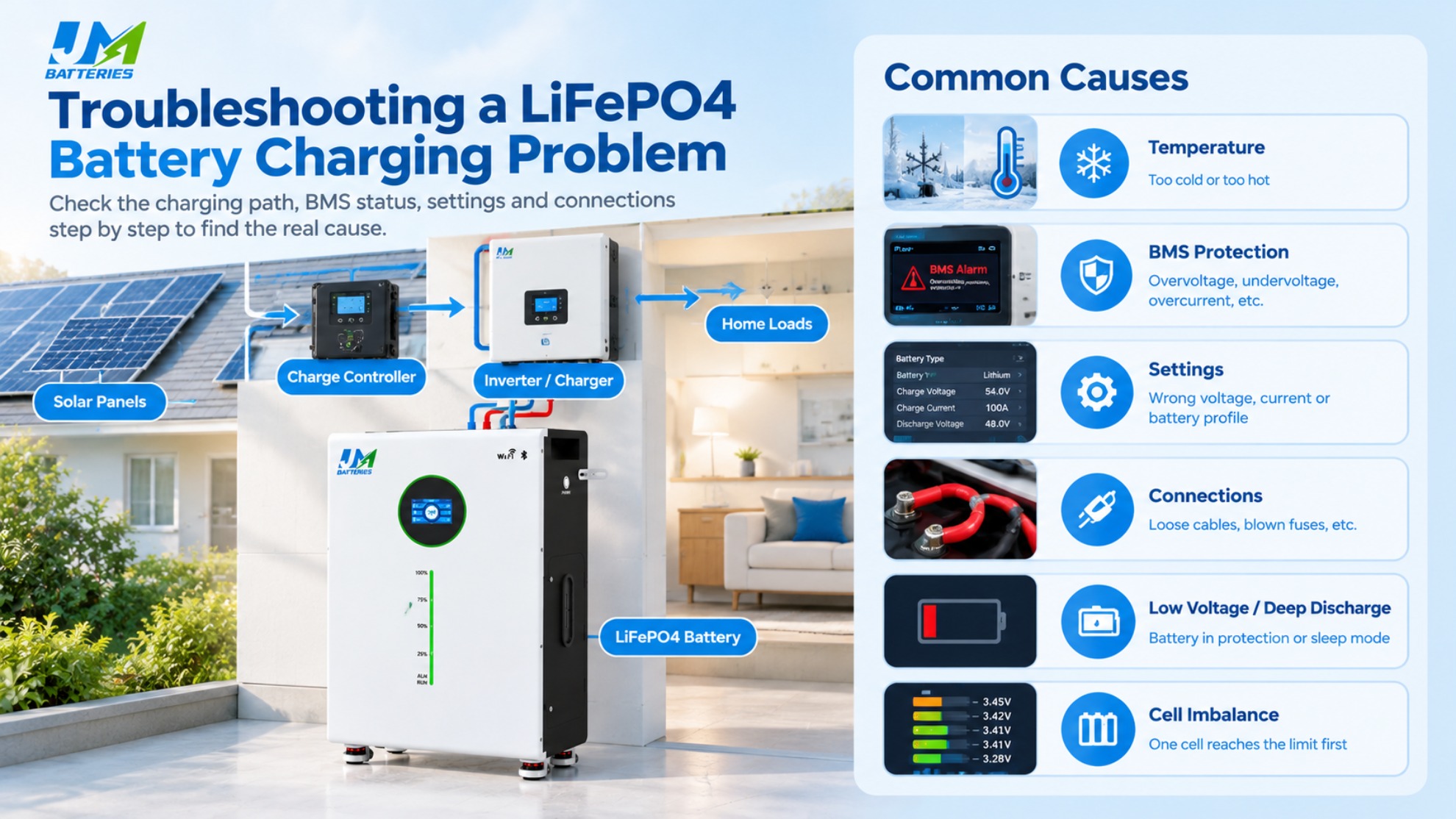
Good installation practices and regular system checks can reduce avoidable charging interruptions.
- Use compatible equipment: Confirm that the battery and charging device support compatible voltage ranges, charging parameters, and communication requirements.
- Follow the manufacturer's settings: Use the specified charging profile and permitted current limits instead of copying settings from another battery.
- Monitor temperature: Install and operate the battery within its permitted environmental conditions.
- Review alarms promptly: Investigate repeated protection events rather than treating each interruption as an isolated incident.
- Inspect the installation: Arrange appropriate checks of cables, terminals, fuses, and protective devices.
- Avoid prolonged deep discharge: Follow the manufacturer's recommendations for storage, standby operation, and low-state-of-charge conditions.
- Keep system records: Record fault codes, battery voltage, temperature, charging current, and the conditions under which the problem occurs.
Battery state of charge is an estimate rather than a direct measurement of all the energy remaining in a battery. If the displayed percentage seems inconsistent with charging behavior, understanding battery state of charge (SOC) can help explain the difference.
6. When to Contact the Manufacturer
Contact the battery manufacturer or a qualified technician if the battery remains unresponsive after the approved checks, repeatedly enters protection, reports persistent cell-voltage faults, or cannot be recovered using the documented procedure.
Stop using the system and seek appropriate assistance if you notice unusual heating, swelling, physical damage, smoke, or other signs of a potentially unsafe condition. Do not continue testing a battery that may be damaged.
When requesting technical support, prepare the following information:
- Battery model and relevant identification information.
- Charger or inverter model.
- Battery voltage and charging current, if safely available.
- Battery temperature and reported BMS alarms.
- The approximate state of charge when the problem began.
- Whether charging never starts or stops after running for a period.
- Any recent changes to the system, settings, wiring, or operating environment.
These details help narrow down the cause and reduce unnecessary component replacement.
7. FAQ
Why is my LiFePO4 battery not charging?
Common causes include low or high temperature, BMS protection, incorrect charger settings, deep discharge, cell-voltage imbalance, and wiring or fuse problems. Check the charging source, battery status, and manufacturer specifications before replacing components.
Can a LiFePO4 battery stop charging because of cold weather?
Yes. Many batteries restrict charging when their cells fall below the permitted charging temperature. Charging below the specified limit can damage lithium-ion cells. Check the battery temperature and follow the manufacturer's instructions.
Why is my lithium battery not charging even though the voltage looks normal?
A normal-looking pack voltage does not guarantee that charging is permitted. The BMS may have restricted charging, the charger may be using incorrect settings, or a communication or connection issue may be present. Review the alarms and charging configuration.
Can a BMS prevent a LiFePO4 battery from charging?
Yes. The BMS may stop or restrict charging when it detects a condition outside the battery's permitted limits. Identify the protection trigger and follow the model-specific recovery procedure. Never bypass the BMS to force charging.
Why does my LiFePO4 battery start charging and then stop?
Charging may stop because of a cell reaching its voltage limit, temperature protection, incorrect charger settings, intermittent connections, or an inverter communication problem. Check BMS event records, cell readings, temperature, and charging parameters.
Why won't my LiFePO4 battery charge to 100%?
Possible causes include configured charging limits, cell-voltage imbalance, BMS protection, temperature restrictions, or differences between estimated SOC and the battery's actual condition. Review the charging profile and battery monitoring data.
How do I recharge a deeply discharged LiFePO4 battery?
Check the manufacturer's low-voltage recovery instructions first. Some batteries enter a protection or sleep state and require a specific approved procedure. If the battery remains unresponsive or shows abnormal readings, contact the manufacturer rather than force-charging it.
Can an incompatible inverter stop a LiFePO4 battery from charging?
Yes. Incompatible voltage settings, charging profiles, or communication configurations can prevent correct charging. Confirm that both devices support the intended battery configuration and follow their documentation.
How can I tell whether my LiFePO4 battery charger is faulty?
Check the charger's status indicators, input power, documented output specifications, settings, and external connections. Where electrical testing is necessary, use an appropriate procedure and qualified personnel. A battery that does not charge does not automatically mean the charger is defective.
When should I contact the battery manufacturer?
Seek support if the battery remains unresponsive after approved checks, repeatedly enters protection, reports persistent cell-voltage faults, or shows signs of damage or abnormal heating. Provide the battery model, charger or inverter model, readings, and fault codes when available.
8. Conclusion
When a LiFePO4 battery stops charging, the most useful first step is to determine whether the problem comes from the charging source, battery temperature, BMS protection, charger settings, electrical connections, or the battery itself.
Check the system methodically, interpret fault codes using the correct documentation, and avoid changing several settings at once. Never bypass battery protection or use an unapproved recovery method.
For residential energy storage systems, correct battery and inverter configuration is an important part of reliable operation. For more information about LiFePO4 home energy storage products and technical support, visit JM Energy Tech.
Why Is My Inverter Not Charging the Battery